Showing posts with label watermark. Show all posts

Sunday, April 15, 2007

Watermarks revisited - online

A while back I posted about watermarking photos using a tool you download called Picture Shark. This was a tool you donwloaded and worked with on your computer. Well I may have found an easier solution. It's a tool you can use online, no downloading and installing of a program. It's called Watermark Tool. No registration forms to fill out, just upload your file and select your watermark options to quickly and easily watermark your images.
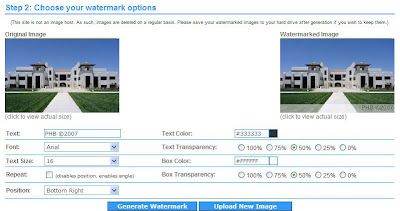


You have the ability to choose the text, color, transparency, and more, you're able to personalize your watermark to suit your needs. It doesn't get much easier than this.

Tuesday, March 13, 2007

The tool to Watermark photos

I searched around for a program that will create a watermark for photos and found picture-shark.

Here are some of picture-shark's features:
  • With its wizard like interface it is super easy to use
  • Create real watermarks
  • Choose transparent color, opacity, position and much more
  • Use the "feather"-feature to make the edges between the stamp and the picture smarter
  • as with any other tool, just by one mouse-click
  • Very fast (processing hundreds of pictures each minute)
  • Support for different output formats and quality settings
  • WYSIWYG preview-mode for all settings
  • Support for preserving jpeg-headers
  • copy & paste between other applications and picture-shark


>> Step by step guide